শুক্রবার, ৩০ অক্টোবর, ২০১৫

Choosing a Great Domain Name
Blogging is a long journey. Once you start blogging, you continue it over the years. There are many bloggers who do not persist and they stop blogging because they do not see the results immediately. But if you persist, then there are huge rewards waiting for you. At some point if you blog has at least 1,000 genuine followers who look forward new posts – then you can consider yourself a blogging success.
Let’s say you do reach a point where there are 1,000 readers waiting for your next post. If you reach that position, your blogging journey will become unstoppable. You will get on to a positive spiral and your blog’s value will go up exponentially as months and years pass by.
On this blogging journey, you can changeyour blog’s design, hire new writers, add premium plugins and change the focus of your blog. But there is one thing you will never be able to change – your domain name.
Your domain name is your brand and changing a brand name is not an easy process.
Your domain name would also define what you can do with your brand. That’s why this post is about choosing the best possible domain name for your blog even before you get started blogging.

Generic Domain Names Vs. Keyword Domain Names

When you are choosing a domain name for your blog, you have to option to go with a brandable domain name or a keyword focused domain name.
A generic brand name like ShoutMeLouddoesn’t mean anything specific and it has the capability to launch anything and do anything.
However, let’s say you have a domain name such as BlogginginIndia.com. This name will restrict you to talk about blogging with a focus on India. A reader from outside India will not follow this blog because they will know that this is only for India.
Focusing is good but if you want to expand your reach in the future, the domain name should not be a road-block for you.
For example, if Google started with a name like SearchEngine.com, they would not be able to expand the brand beyond being an online search engine.
Brandable names are always better than keyword focused specific names when you want to build a valuable brand.
However, if you are just looking to build a small niche blog and work on it as a side project, keyword based domain names are OK.

Is it Possible to Change Your Domain Name Later?

You may think that you can get started with some name now and later change the brand and domain name if you want to change focus. But you cannot change your domain name on a later date because the domain name becomes your brand. Your backlinks, popularity and search traffic are all linked to your domain name.
Very few people have successfully changed their domain name without getting hurt. SeoMoz.org changed to Moz.com successfully. But I wouldn’t take a risk like that unless I have the branding, marketing and SEO expertise like the guys at Moz do.
This again brings us to the point that it is very important to start a blog with a good domain name. Some bloggers who do not start with a good domain name always feel bad about the choice they made years back.
Some bloggers get stuck with bad domain names which are difficult to remember and prone to type-in mistakes when someone is looking for their blog.
For example, Yaro Starak is a well-known blogger but his blog is built on the domain name Entrepreneurs-Journey.com. He has expressed several times during his private coaching program that he should have started with a better name.

Yaro Starak - Entrepreneurs-Journey
If he got 10% more branding, reach and traffic with a better domain name today, how much do you think it would be worth?
If his website is worth one million dollars today, 10% of it would be $100,000. Which means that if he had the money to invest, he could buy a very good domain name for $100,000 and he would still be profitable.
Of course, everyone cannot predict the future success of a blogging project and also we do not have big money to start with. However, it doesn’t mean that you can settle for a mediocre domain name – especially if you are very serious about blogging.
Another example is Darren Rowse from ProBlogger.net. It is a nice name, but he started losing a lot of traffic to the .com version. When people think about websites, they think about .com. He was losing so much traffic to the .com domain name that even without a proper website in place, the Alexa traffic rank of ProBlogger.com started going up dramatically! He had to purchase ProBlogger.com later to protect his brand.
So if you haven’t started a serious blog yet, here are some tips to choose the right domain name for your blog. Having a good domain name will take you places and it will become a valuable brand of its own. So what makes a good domain name?
1. Go for a .com. Always!
I am a big fan of .com names. Even after there have been so many domain name extensions launched in the recent years, .com doesn’t seem to lose its value. Every time a company brands itself with a .com, the value of .com goes up.
AirAsia
AirAsia did a rebranding of all their airlines where earlier it was just written as AirAsia on their flights and it has now changed to AirAsia.com.
When you see the airplane at an airport the .com is written in such a big font on the side of the airplane. Such branding activities increase the value of .com!
Usually, many people prefer going for a .net or .org if they don’t find a .com version but in the long run, they will end up losing some traffic to the .com version (like ProBlogger.net).
People remember brand names more than the extensions and they will just type in brandname.com.
When I was running my blog BikeAdvice.in, many people used to refer my website as BikeAdvice.com. I tried to get in touch with the owner of BikeAdvice.com but, he was asking for $25,000. The price of the .com version went up only because my .in blog became famous.
If you don’t want to go for a premium domain name, you can also try your luck atLeanDomainSearch.com where you will find plenty of .com names that are available with different combinations of words.
For example, if you are going to start a blog about cars you can find .com names with a prefix or suffix to the word ‘Car’. I just found out that the domain name CarSigma.com is available. Not a bad name for a blog about cars, if someone wants to take it up.
2. The Domain Name Should Pass the ‘Phone Test’
This is the most basic requirement for choosing a domain name. If a domain doesn’t pass the phone test, I would think twice before building a blog or a brand around it.
If I tell you my domain name on the phone, you should be able to just type it out without asking me again to spell it out.
So if I say “Visit DigitalDeepak.com” on the phone to you, you will be able to type it out without asking me to spell it out. Both the words Digital and Deepak are common and “.com” is very clear.
“Visit ShoutMeLoud.com” – again there are no chances of spelling mistakes happening here if I tell it to you on the phone. Whenever I invest money in domain names, I make sure that it passes the phone test. Even if the domain name is 3 words, it’s OK, but it must this test.
3. Get a Premium .com Domain Name If You Don’t Have Any Alternatives
Premium .com Domain Name
Now that I have convinced you that you have to go with a .com, the next question that you probably have is: what can I do when almost all the .com domain names are already taken.
Yes, it is a fact that most of the .com names are already taken but that shouldn’t prevent you from getting a .com. There are plenty of .com names that are being resold. You will be able to find good .com domain names from the premium domain name market.
Here’s are some places where you can find a premium .com name:
  • Sedo.com
  • Afternic.com
  • HugeDomains.com
  • BuyDomains.com
Such premium domain name market places sell the domain names for $500 to $1,000. I am not sure what is your appetite but if you are going to bet your future income on blogging, spending up to $1,000 for a good domain name is reasonable.

Where to Register and Hold Your Domain Names?

If you have found a .com name available for registration, you can register that name inGoDaddy or ShoutMyDomain. The price for the first year of registration in these registrars is extremely cheap – mostly around $2-$12.
Transferring your domain names is possible after two months of registration. When you transfer your domain names to a new registrar, they will give you one-year renewal for free which is usually cheaper than their normal renewal charges.
Any questions about choosing the right domain name? Leave a comment below.
Also check out:
This is a guest post by Deepak, who blogs about digital marketing atDigitalDeepak.com. Check out ShoutMeLoudguest submission guidelines

5 Must-have Gmail Extensions for Every Freelancer

Must have Gmail Extensions For Freelancers
Follow me in Twitter
Subscribe me in YouTube
Like us in Facebook
Do you struggle with making your inbox an asset for your business, instead a liability? Have you given up on ever seeing “inbox zero”? Is your inbox just an in/out tray without serving a bigger purpose?
You’re not alone. I know many writers, bloggers and freelancers who have thousands of unread emails in their inboxes. And it’s not just unread emails that are the problem. It’s tracking client follow-ups if you didn’t get a response or having too many subscriptions that you have to sift through daily.
However, there are so many ways you can power-up your inbox. And since most of us use Gmail, I’m going to list down a few awesome Gmail extensions that I have started using to turn my inbox into a productivity powerhouse.

5 Useful Gmail Addons for Freelancers & work from home people

1. Streak

Streak
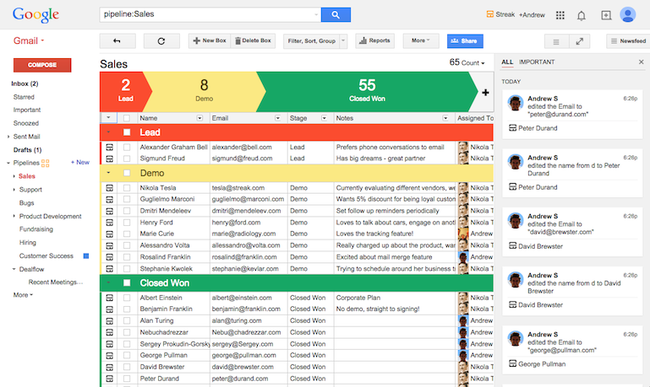
This is by far my favorite, and also most recent, addition to my Gmail inbox. Streak is a CRM – customer relationship management – tool. It has too many features to effectively outline, but here are the main things I love about it.
  • Add emails to boxes (each client or project can be a box) so you can see all communication with one client in a go.
  • Set emails to return to inbox if you don’t get a reply. I’ve even gotten a few jobs just because I followed up when I didn’t hear back.
  • Track the stage a project is in (closed, won, negotiations) and the value of the entire project.
  • Assign tasks and reminders to each box.
There are a lot more features, and while I use the free version (and it’s more than enough for my needs) you can also sign up for a paid account (starting at $19/month) to upgrade your experience.
If you’re installing one external Gmail extension, let this be it!

2. Boomerang

Boomerang
Boomerang has been around a while, and when it launched it was a one of a kind tool. A boomerang is a Frisbee like toy, which when thrown in the air, returns to you itself. Now that’s cool!
So the idea of Boomerang, the app, is similar. You can set emails to return to your inbox in a few days.
This is perfect for when you have to do a task, let’s say call someone or view travel plans. You setup the email to return to your inbox on that day, which allows you to remove the email from your inbox for the time being.
Since then, they’ve added more features. You can write an email and schedule when you want to send it. This is perfect for making sure your email hits the receiver’s inbox when they’re in office. You can also return email to your inbox if you don’t get a response.
I’m still on the free version, which has a limit of 10 emails a month (because I use Streak, which has similar functionality), but the paid accounts start as low as $5/month.

3. Rapportive

Rapportive
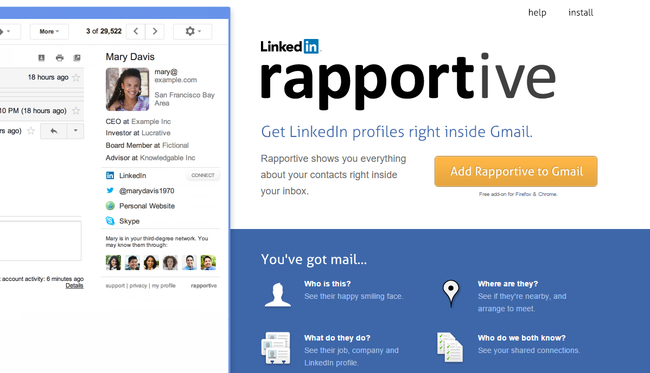
As a freelancer, I often have to email people I’ve never met, and sometimes the only thing I know about them is their email address. When applying for freelance gigs, it’s a little nerve-wracking, as I don’t like using the same template for every job I apply to, but I can’t exactly guess someone’s name or job-based on their email address.
Before Rapportive, I’d quickly Google the email to see if something popped up, but Googling a potential client always took up too much time or didn’t result in any useful results.
Rapportive provides you with your contact’s LinkedIn information right in your inbox so that you can customize emails. It’s a lifesaver, as I now know which industry the client is in, what experience they have, and even what they look like. You can even find shared connections without leaving your inbox!

4. Unroll.me

unrollme
Tired of too many subscriptions? You’re not alone. Almost every website now has a “sign-up for our mailing list” box, and hoarder that I am, I can’t help but sign up for each one. Of course I don’t have time to read all of them, so I’d end up leaving the newsletters in my inbox, hoping one day I’ll get to them and pretty soon there were dozens of unread emails to go through.
Enter Unroll.me.
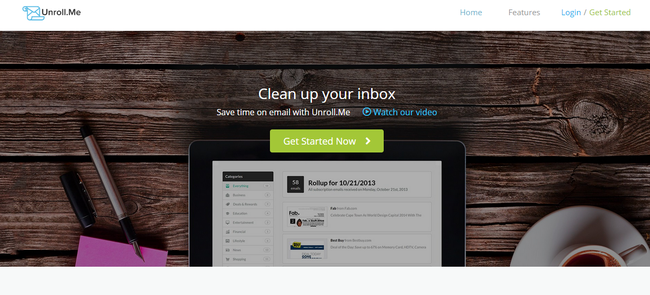
Unroll.me goes through your inbox and makes a list of all your subscriptions. From here you can either unsubscribe or add the subscription to your daily Rollup. Your Rollup, which has all your subscriptions in one email, is sent to you every day at a time of your choosing.
This is a timesaver. You still get all the subscriptions you love, but since they’re in one email and sent at a convenient time for you, it’s easy to get through them on the same day. Secondly, I love how easy it is to unsubscribe from random email lists I didn’t even remember signing up for!

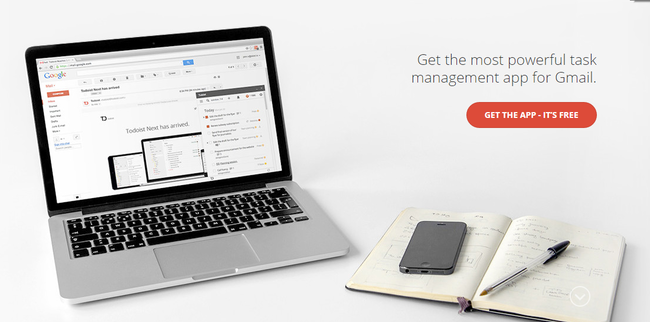
5. Todoist

Todoist
Everyone has a favorite to-do list app. I’ve gone through a few myself in the last year or so, and while some of them have come close to being “perfect”, none has gotten as close as Todoist.
Now Todoist is technically also a web-app, which you can access without Gmail, but the Gmail extension let’s you maximize its utility.
From within your inbox, you can turn emails into tasks with just one click, add them to an ongoing project, set deadlines or even assign them to someone else to handle. Of course, since Todoist is available on a total of 13 platforms – which includes every device possible – you’re never far away from your to-do list.
While I’m still using the free version, an annual subscription is just $29/year.
I could go on about more Gmail extensions that are awesome and helped me get my inbox under control, but too many extensions can end up being distracting. These five extensions, however, are my go-to, and used in each of my Gmail inboxes.
If you haven’t tried it yet, I’d also suggest taking a look into Google Inbox. Since it’s not an extension, I’m not including it in this list. However, I’ve seen people who have thousands (yes, thousands) of unread emails in their inbox get down to inbox zero because it bundles emails based on type, allowing you to filter out noise very quickly. If you’re in desperate need to control your inbox, I’d suggest starting with Inbox to help with email triage.
Which extension would you recommend I try out next? I’d love to hear back your thoughts in the comments as I’m sure there are many I either haven’t heard of or haven’t given a fair shot to!

How to Improve Your Typing Speed and Accuracy

Improve Typing Speed And Accuracy
Follow me in Twitter
Subscribe me in YouTube
Like us in Facebook
One of the most essentials skills to have been discontinued from teaching during your schooling age is typing. Although people tend to underestimate the value of typing faster and accurately, it is one of the most fundamental skill required in any field you wish to pursue. Be it in writing Emails,writing a blog post, or writing copy, typing is one of the most important skills. As a blogger, typing faster and better will save you a tremendous amount of time spent proofreading your article for typo mistakes and crafting the article itself. While theaverage typing speed is around 38-40 Words Per Minute, the world-record for the fastest typing speed is of Stella Pajunas, who struck a whopping 216 WPM on an IBM Electric Typewriter! Typing accurately is also just as important as typing faster is. There is aspeed-accuracy tradeoff that has to be considered when you begin practicing typing faster. Faster is not always better if your accuracy is getting compromised in the process. Aiming for a faster and accurate typing speed is essential. Finishing that assignment, blog article or just an Email quickly and saving yourselves some amount of time in the process is a great way to make room for other tasks. Having written over 10 million words in all forms off written words, I can justify how valuable improving your typing speed and accuracy is. With the majority of the audience here at ShoudMeLoud being bloggers or wannabe bloggers, it is the time that you work on your typing speed, while not compromising on the accuracy part of it.

How to type faster & get things done fast

Now that you’re convinced about the importance of typing faster and accurately, let’s move on to the how’s of it. Here are six ways to significantly improve your typing speed and accuracy.
Rework the way you type
Desk typing ergonomicsThe first step to improving your typing speed and accuracy is to reconsider the way you approach typing. The moment you sit down to get some typing done is what decides everything that follows next. During ourErgonomics and human factors class, we’ve been walked through all the fundamentals of proper posture, backed by numbers, to avoid Cumulative Trauma Disorders (CTD). To begin with, proper posture is the first step in preparing yourself for success. Without working on a proper positioning and typing habit, one cannot achieve high typing speeds while maintaining acceptable accuracy levels.
To get started, make sure that you are sitting upright and with your back not leaning forward towards your desk. A proper upright position helps increase concentration levels and will give you the needed focus boost to type efficiently. Secondly, the way youposition your wrists and elbows also make a considerable difference in typing faster and accurately. Make sure that your elbows are always positioned at right angles to the keyboard and that your arms are not bent upwards or downwards. This bending of your arms will make it harder on your forearms or wrists if not positioned properly. Apart from a proper posture of your body, proper positioning of your fingers is also essential. Below are a few methods to position your fingers for typing faster:
  • The left-hand pinky finger being placed on the ‘A’ key and responsible for all the keys to the left of it including left shift, caps lock, control/cmd, etc.
  • The right-hand pinky key being placed on the Colon/Semi-colon button and being responsible for everything on the right of the key.
  • Position at least one of your thumb on the Spacebar key.
  • The ring finger, middle finger and index finger of your right hand should be placed on the keys S, D, and F respectively.
  • The ring finger, middle finger and index finger of your left hand should be placed on the keys L, K, and J respectively.
Eyes away from the keyboard!
Eyes away from keyboardIf you might have ever attended some sort of typing classes, you could remember the way tutors used to force people to type without looking at the keyboard. The sub-conscious mind is pretty powerful and as you type daily and more often, you will develop the habit of typing faster and not looking at the keyboard while doing so. Looking at the keyboard while typing reduces one’s typing speed and the written words are more prone to errors as you are not aware of what’s being typed into it. Although this means more errors initially, this technique itself will be the reason for your increased typing speeds. A little bit of cheating is permitted, where you can peek once in a while at the keyboard, but try to look away from the keyboard as much as possible as you are typing. Looking away from the keyboard and the screen during typing aides in real-time copy-editing, saving you a lot of time in the end. You easily get used to the layout of the keyboard and the positioning of the keys as you work your way without looking at the keyboard much often.
The Quick Brown Fox!
“The Quick Brown Fox Jumps Over The Lazy Dog”
Does the above sentence ring any bells to you? This special sentence has every alphabet of the English language in it. It is also one of the primary reasons you would find most fonts illustrated through this very sentence. This special sentence would also help you improve your typing accuracy, with some practice of course. Practice typing by typing this sentence repetitively. Although you are bound to make some mistakes early on, over the long run you’ll benefit much from this sentence alone.
Practicing this sentence multiple numbers of times will help you understand the positioning of all the alphabets on the keyboard. This understanding will help you achieve better typing accuracy while you are working on the improving of your typing speed. Get well-versed in the positioning of all the keys on the keyboard by practicing this sentence often times.
Repetition is good, sometimes!
While repetitive and monotonous tasks are no good in boosting your creativity, practice does make one perfect! Try to practice some amount of typing daily to keep the skills you’ve been accruing over the past couple days and weeks. A 30-minute of daily typingwill help you tremendously in improving your typing skills and achieve a better accuracy rate while typing faster. Set a certain goal according to your present typing speeds and try to aim a bit higher the every other time around. With practice and patience, over time you will witness your typing speed improve significantly. Remember Malcolm Gladwell’s famous statement in his book Outliers on learning anything you wish to-
Although that would be a significantly large number for learning to type faster, growing complacent is a worse way to damage everything that you’ve been working on in the past. Work on your set WPM goals daily, by trying to avoid affecting your typing accuracy in the process.
Make the most of online tools for typing:
Typing Lessons on the WebWhile you can improve your typing speeds by daily practice or by joining some kind of typing classes, there are also certain online tools which you can use to improve your typing speed. With the rise of the number of tools available online for each purpose, here are some of the best online resources you ought to check out for improving your typing speed and accuracy.
  1. QWERTY Warriors – A typing game to improve your typing speed and accuracy by demolishing oncoming attacks by words!
  2. Sense-Lang Typing resources – The best resource for free typing tutorials, games, tests, certifications and much more.
  3. Typing Test – Check your typing speed and accuracy with this free complete typing test.
  4. Typing.com – Another free typing resource to work on your typing right from a beginner to advanced level.
Blog more often
Another great way to remain focused on practicing typing daily while also improving your writing skills is by blogging daily. This would help you improve your language and also your typing speed and accuracy. Frequent diligent updating of your blog, web page or for an online journal will help you remain focused on improving your typing speed and accuracy. This way you would also be making some good use of your time and giving you a productivity boost in the process. If you are not yet ready to get started on your own blog, try to consider publishing articles on Medium and other such platforms to work on your thought processing, language, and typing speed. An essential part of improving any skill is through rigorous patience, persistence, and hard work. Do not expect anything to come easily and try to work your way towards it. Practice accurate typing often and in no time you’ll see yourself typing lengthy pieces of articles in significantly lesser time. What do you think about these tips regarding improving typing speed and accuracy? Have any more suggestions that you would like to add to this list? Shout out with your thoughts and comments on typing faster and accurately below.

How To Enable HTTPS For Your BlogSpot Blog

Enable HTTPS For BlogSpot
Follow me in Twitter
Subscribe me in YouTube
Like us in Facebook
HTTPS has become a web-standard & one of those practices that every webmaster should follow. HTTPS is great for the security of data as it encrypts the data transferred between users & a website. Especially it protects them from common hacking practices such as data sniffing & man-in-the-middle-attack.
I won’t get much into the technical side of it, but let me quickly give you an overview of how HTTPS is useful for security of users like you & me.

HTTP (Hyper-text transfer protocol) S (secure)

When you open a website using HTTP protocol, or submit a form online, your data is transferred in plain text & a hacker can use sniffer tools to capture the transmitted data & see the information you have submitted. Sometimes which also includes your username & password. When you access a website that uses the HTTPS, the transmitted data is encrypted & your information is secure. This is one reason all banking & e-commerce sites are using HTTPS from day1. Below image shows the difference between HTTP & HTTPS protocol:HTTP Vs. HTTPSLast year, Google made HTTPS as a standard practice &  an official search engine ranking factor. This story generated a mixed reaction from bloggers & websites owners, as there is no money transaction happening on the website & HTTPS doesn’t seem so important for information based blogs/websites. From my understanding on this topic, I believe it’s important to have HTTPS even for the blogs, as no middle-man can alter the information. If you are up for learning more about it, I suggest you to read this article on Man-in-the-middle-attack. You can learn more about Google’s HTTPS everywhere mission with this video; https://youtu.be/cBhZ6S0PFCY So far, I haven’t implemented HTTPS here at ShoutMeLoud, which is long over-due & will be done in the coming months. One reason for the same is the mixed content issue, which I have explained at the end of this article. For now, here is a great news for BlogSpot blog owners, as Google have rolled out free HTTPS for them. In this guide, you will learn everything about enabling HTTPS on your .blogSpot blog & few important things related to it.

How to make your BlogSpot Blog HTTPS enabled for free:

This feature is already enabled for all the BlogSpot.com users. Those users who are using the custom domain name, they need to wait for a while before they can take advantage of it. If you have a blog with .blogspot address, follow the steps mentioned to enable HTTPS for your blog.
  • Login to your BlogSpot dashboard
  • Click on the dropdown & go to your blog settings
  • Go to Settings > Basics & look for HTTPS Settings option
  • From the HTTPS availability dropdown, select yes & save the option.
Enable HTTPS BlogSpot blogThat’s it, and your blog is not HTTPS enabled. Your blog will become accessible over both HTTP and HTTPS connections.Though a word of warning, this may cause some issue due to mixed content on your blog. This can be caused by few things such as images on your blog hosted on HTTP site. Mixed Content errors occur when a web page downloads its initial HTML content securely over HTTPS, but then loads the follow-up content (such as images, videos, stylesheets, scripts) over insecure HTTP. These browser errors will degrade both HTTPS security and the user experience of your blog. If all your blog images & content are hosted on BlogSpot platform only, you might not face any such error. You can read this help guideto fix it or probably wait for few months before enabling HTTPS.  This feature will be available for bloggers using the customdomain name with their BlogSpot blog in the coming months. I believe most of the serious Blogspot bloggers have already purchased a domain name rather than using generic .blogspot domain address. Here is official help page for enabling HTTPS on a BlogSpot blog.
I will update you once this feature is available for all BlogSpot bloggers. For now, I would like to hear your opinion on: Is HTTPS important for information based websites? Here are some of the best articles for BlogSpot users from ShoutMeLoud Archive:

A Comprehensive Guide To Keyword Research By Juggernaut Method

Keyword Research Guide
Follow me in Twitter
Subscribe me in YouTube
Words are really important when it comes to search engines, because honestly everything starts from here. It’s the absolute beginning. If you master the science of finding words which your market is currently searching and typing in the box, then I’d say you’ve got the key that leads towards success.
Keyword is just a fancy way to say problems — yes, I call them problems because market is searching for a possible solution, a product, information or any other thing that works like a first-aid kit to their keyword.
If you know what people are searching for, you get to understand the market conditions and can come up with a solution, product or answers to their questions or queries. I’ll be teaching you how you can find gold keywords by my Juggernaut Method that is as simple as learning English alphabets. Let’s get started.
First things first
Before finding a good keyword, you’ve to understand your own website in a crystal-clear manner because if you don’t, it’ll terribly impact your business in the future because I’ve personally experienced it. So, do not rush during keyword research because this is where you lay the foundations of your brand or business. So, the first thing to understand is the nature of your website — you must know in which niche, industry or category your website falls in. Is it a blog that shares information about computers? Or an eCommerce website for shoes? Once you’ve identified the model of your website, you’ve technically completed first step of keyword research.

List out the Keyword ideas

Now is the time to list out important topics, ideas and relevant things that is directly related to your business or website that the market may be searching for. You’ve to see from the market’s eye and think what they’re thinking. If you’ve a blog that shares latest information about computers and its hardware, then you can search for keywords like these:
  • how does a CPU work
  • best 24 inch monitor
  • what is the difference between RAM & ROM
  • best motherboard for gaming
Now most of  you will ask, “How to find the ideas?”, well, it’s a pretty simple process. There are lots of keyword suggestion tools on the Internet but I recommend using the free Google Keyword Planner tool as it’s easy-to-use and gives you everything you need all in one place. The working of the tool is quite simple, just enter a query in the box and it’ll come up with suggestions along with number of searches.

Value of a Keyword

After you’ve piled up the ideas and topics, it’s now time to determine the value of those keywords. We’re not going to use a keyword which people are not searching, or in which advertisers are not interested at all. From my list, I’m going to pick the third keyword and run it through the Google Keyword Planner:
Bad Keyword
Keywords are classified into 2 broad categories: a bad keyword and a good keyword. I’m gonna show you what a bad keyword looks like.
Google Keyword Planner tool

After the processing, the tool has given us some meaningful results:
Keyword ideas

Always select the “Keyword ideas” tab because we’re searching for different topics, we’re not here for advertising. So, as you can see only 20 people search for this keyword in a month which is extremely low. We don’t want such types of keywords because it’s almost 0% traffic. Now, let’s search for the same keyword in Google to see what the search engine has to say about it:
Google Search for Keyword
The results:
Result for a Keyword search in Google

After searching for the keyword, we can see that we’re getting only organic search results which means advertisers aren’t interested at all. That is a clear symbol of a bad keyword. It is not going to bring us any sort kind of traffic due to the volume of searchers and it’s not going to reward us money, so you don’t want that kind of keywords.
Good Keyword
Let’s discuss the characteristics of a good keyword. The two most important metrics are: number of searchers and suggested bid according to Keyword Planner.
As you can see the keyword which I’ve selected is “how to lose 10 pounds in 2 weeks” below. Let’s process it and get the results:
Keyword Planner
Good Keyword
Our keyword has a whopping 12,100 average monthly searches that is excellent. Don’t confuse the “Competition” in Keyword Planner with keyword difficulty, rather it shows the competitiveness of advertisers regarding this keyword. Even though it has low competition in the eyes of advertisers, but they’re still paying, so it’s indeed a rewarding one. This is a great example of a good healthy keyword.

Long-tail Keywords

When it comes to keywords, the most general and broad keyword is of extremely high competition. For example, “shoes” is a general and broad keyword which possibly has hundreds of thousands of searches per month, thus increasing the competition level. You cannot exactly say what people are exactly looking for when they’re searching for “shoes” — they might possibly be looking for some nice images of shoes, or like general information about shoes — there can be lots of variants and options.
The gold lies in the long-tail keywords. They’re just basically more specific keywords which the majority of the Internet searches for. The example I gave for a good keyword was “how to lose 10 pounds in 2 weeks” is also a brilliant example of a long-tail keyword as well. Long-tail keywords are a combination of 3 or more words typed in the search box. Why is it a good technique to use long-tail keywords? Because there is less competition and more volume of searchers.

Resources for Keyword research

We’ve a plenty of resources for keyword research. Some of them are:
Summing it up
Keyword research is the most integral part of the complete SEO process. It is where you lay the foundations of your business and can literally make or break your game. Invest good time in searching for valuable keywords. Go for long-tail, less competitive and moderate amount of searches (between 3,000 to 5,000 per month). Make sure you thoroughly research the keyword to clearly understand its difficulty because if you’re trying to rank a keyword on which sites like Microsoft or CNN is already on top, then you’re out of luck.
If you’ve some good resources of keyword research tools then please do share in the comments below! Constructive criticism is more than welcome.
This awesome post is contributed by Muhammad Talha. If you want to submit something original for ShoutMeLoud bloggers community, you should read our submission guidelines.